
Could it be something else ?
Understanding the tool
You will find direct access to the tools below. The full article with all explanations on how the entire tool works is available on the blog; you can access it by clicking the button below.
Data collection
To get started with data collection, it’s very straightforward:
- If you don’t already have one, create a (free) Notion account
- Access the template using the button below
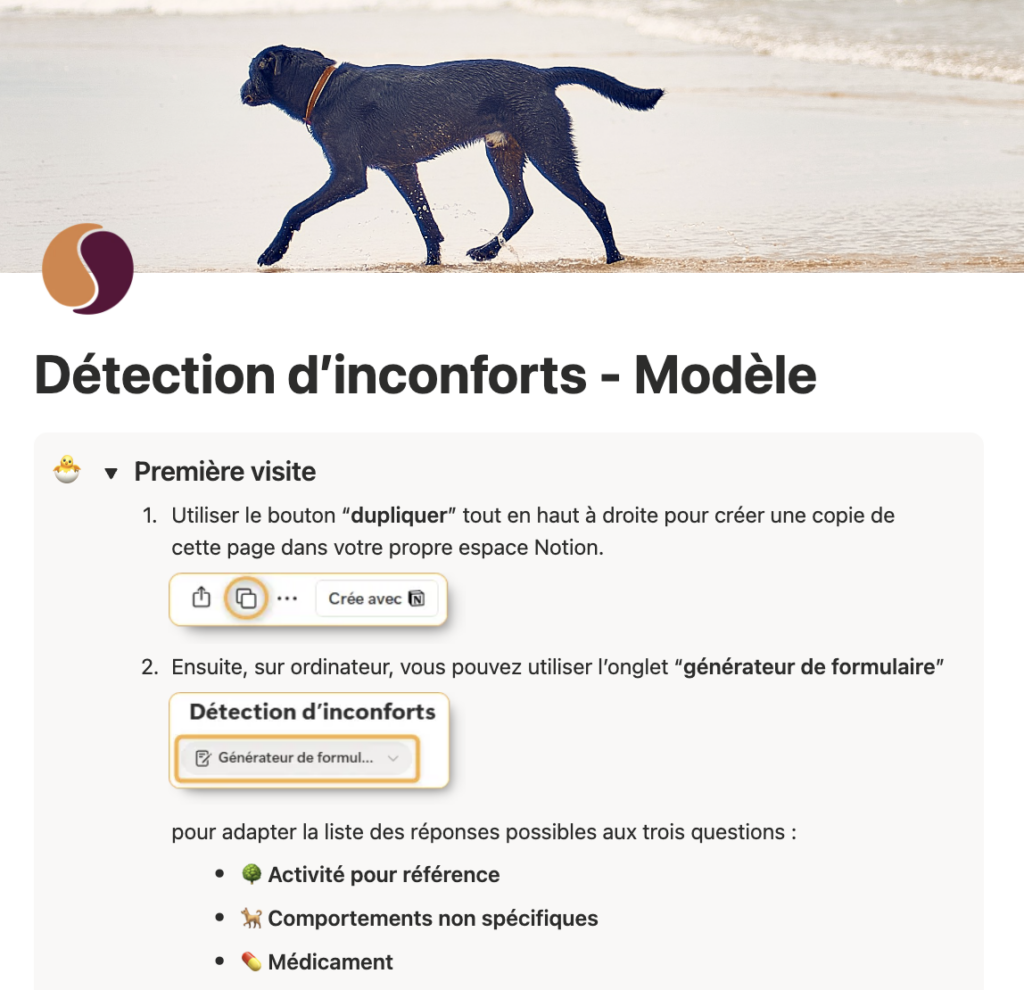
- Expand the “First visit” section and follow the instructions (thumbnail shown on the right).
That’s it—you’re ready to start collecting data (see the video on the right). As needs arise, you can adjust the available options (in particular reference activities and non-specific behaviours) to suit your situation and refine the data collection.
Instructions for exporting the CSV in order to run the analysis are also available on this page.
Analysis
Upload a CSV to check the period, pivots, and structure before generating.
Interpretation via AI (optional)

The report is designed to be fully understandable through simple reading. However, as it is an automated report, it is intentionally very neutral and strictly factual, which can make it somewhat technical or difficult to interpret.
Using generative AI is not environmentally neutral, but in some cases it can provide real added value. Everyone must weigh the pros and cons: if you feel that its use is justified to help you better analyze your dog’s situation, a specialized ChatGPT Agent is available to help you deepen the analysis beyond the content of the report. You can ask it to explain the report more clearly, ask more specific questions about the data from your collection, and get help preparing for an appointment with your veterinarian or behaviourist. The agent is instructed to rely only on veterinary or academic sources; nevertheless, always remain critical.
The agent can also help you set up the data collection / analysis / interpretation workflow, if needed.
You can access the agent via the button below and provide it with the ZIP generated at the “Analyze” step; you can then ask your questions.